Mindstamp Review 2026: Interactive Video for Training and Marketing
This Mindstamp review comes from a real internal need — after growing past a handful of employees, our onboarding videos stopped being enough on their own. People would watch, nod along, and still miss half of what mattered. I started testing Mindstamp specifically to see if adding quizzes and checkpoints into our training videos actually improved retention, not just as a nice-to-have feature.
What Is Mindstamp? (Mindstamp Review: Core Features)
Mindstamp is an interactive video platform that layers CTAs, surveys, quizzes, commenting, and lead capture directly on top of existing video content, hosted on Vimeo, YouTube, Wistia, or a few other platforms. It’s used across video marketing, sales, and corporate training — a broader range than I expected going in.
What we actually used for our onboarding rebuild:
- Tests and assessments — quiz questions embedded at specific timestamps, so a new hire can’t skip past the compliance section without actually engaging with it
- Branching/CTAs — clickable buttons inside the video that jump to different sections based on the viewer’s answer, which let us build one onboarding video that adapts slightly depending on which department someone’s joining
- SCORM compliance — this mattered for us specifically because it meant Mindstamp’s training content could report completion data back into an LMS, rather than us manually tracking who actually finished onboarding
- Analytics and progress tracking — see exactly where viewers drop off or answer incorrectly, which showed us two sections of our old onboarding video nobody was actually absorbing
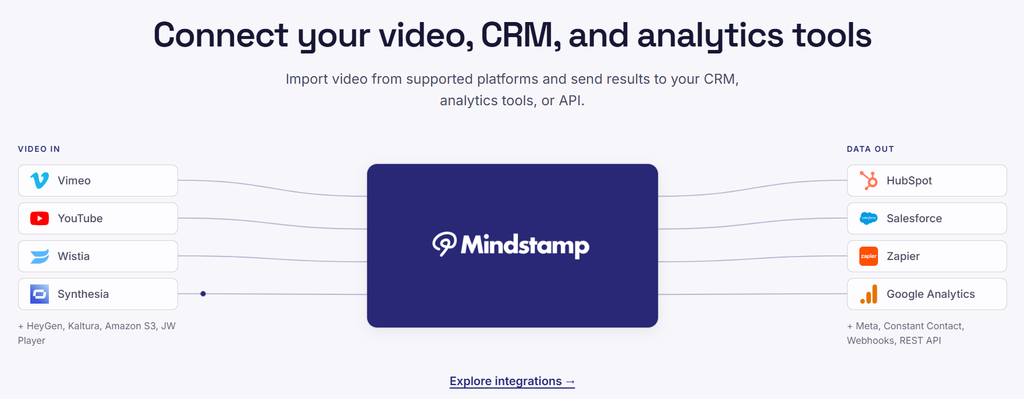
- Third-party integrations — Vimeo, YouTube, Wistia, HubSpot, Salesforce, Google Analytics, Zapier — we connected it to our existing HubSpot setup without much friction
How It Works (Step by Step)
This is roughly what I did rebuilding our onboarding video:
- Upload or link an existing video — we used footage already hosted on Vimeo, no re-filming required
- Drop in interaction points at specific timestamps — a quiz question after the compliance section, a CTA button after the tools overview
- Set branching logic — wrong quiz answers loop back to a clarifying clip instead of just moving on
- Connect to our LMS via SCORM — completion data flows back automatically
- Review analytics after the first few new hires went through it, and found the two weak sections mentioned above
Pricing
| Plan | Price | Videos | Monthly Views | Video Length Limit |
|---|---|---|---|---|
| Starter | $29/mo | 10 | 5,000 | 30 min |
| Core | $99/mo | Higher | Higher | Higher |
| Pro | $249/mo | Higher | Higher | Higher |
A free trial is available. For our onboarding use case, Starter’s 10-video limit was actually enough — we only needed 3-4 interactive videos in the rotation, so we didn’t need to jump to Core.
Did It Actually Improve Retention? (Mindstamp Review: The Real Test)
This was the real question, and based on what the analytics showed after the first cohort of new hires went through the rebuilt onboarding: yes, measurably. The quiz-gated compliance section had a 100% completion-with-correct-answer rate, versus the old video where we genuinely had no way to confirm anyone absorbed that section at all. Whether people retain the information longer-term is harder to measure directly, but forcing active engagement instead of passive watching was the clear win.
Who Should Use Mindstamp (and Who Shouldn’t)
Good fit for:
- Teams building training or onboarding content who need to confirm comprehension, not just track “watched”
- Marketing and sales teams wanting interactive product videos with embedded CTAs and lead capture
- Anyone already invested in a video host (Vimeo, YouTube, Wistia) who wants to add interactivity without re-platforming
Probably not the best fit for:
- Teams needing to create video from scratch — Mindstamp layers interactivity onto existing video, it doesn’t generate or edit raw footage
- Very low-volume users where $29/month for 10 videos doesn’t pencil out against the value of interactivity
- Anyone needing video longer than 30 minutes on the entry tier without upgrading
Pros and Cons
Pros:
- Genuinely improved measurable engagement in our own onboarding test, not just a theoretical feature
- SCORM compliance is a real differentiator for anyone using training content inside an LMS
- Solid integration list (Vimeo, YouTube, Wistia, HubSpot, Salesforce, Zapier) that covered our existing stack without extra work
- Support was responsive when we ran into a setup question — resolved within a day
Cons:
- Doesn’t create video content itself — you need existing footage or a separate production step first
- Entry tier’s 30-minute video cap and 10-video limit can feel tight for a larger content library
- Jump from Starter ($29/mo) to Core ($99/mo) is a big step if you outgrow the entry tier quickly
FAQ
Does Mindstamp create videos, or just add interactivity to existing ones? Just interactivity — you need to bring your own video (hosted on Vimeo, YouTube, Wistia, or similar) and Mindstamp layers quizzes, CTAs, and tracking on top.
Is Mindstamp good for employee training specifically? Yes — SCORM compliance and completion tracking were exactly what we needed to confirm new hires actually engaged with onboarding content, not just pressed play.
Does Mindstamp have a free trial? Yes, a free trial is available before committing to a paid plan.
How much does Mindstamp cost? Starting at $29/month for the Starter plan (10 videos, 5,000 monthly views, 30-minute limit), scaling to $99/month for Core and $249/month for Pro.
Verdict: Final Word on This Mindstamp Review
For anyone whose video content needs to do more than just play — training that has to be confirmed, product videos that need to capture leads, marketing that needs a clear next action — Mindstamp genuinely delivered in our own onboarding rebuild. The completion-with-comprehension data alone justified the Starter plan cost for us, and the SCORM/LMS integration made it a clean fit into what we already had running.
Looking for other AI and SaaS tools to compare? Browse more reviews at getstackpick.com.